Evaluation & Feedback
PlayerUp helps coaches give structured, actionable feedback after every session or game. Instead of ad-hoc comments or scattered notes, coaches can quickly evaluate players across key skill areas, communicate progress, and keep a running record of development over time.
Overview
After each practice or game, coaches can assess athletes on custom or pre-set performance pillars — such as technical skill, teamwork, effort, or decision-making. Each evaluation is shared with the player and optionally the team, creating a consistent, transparent feedback loop.
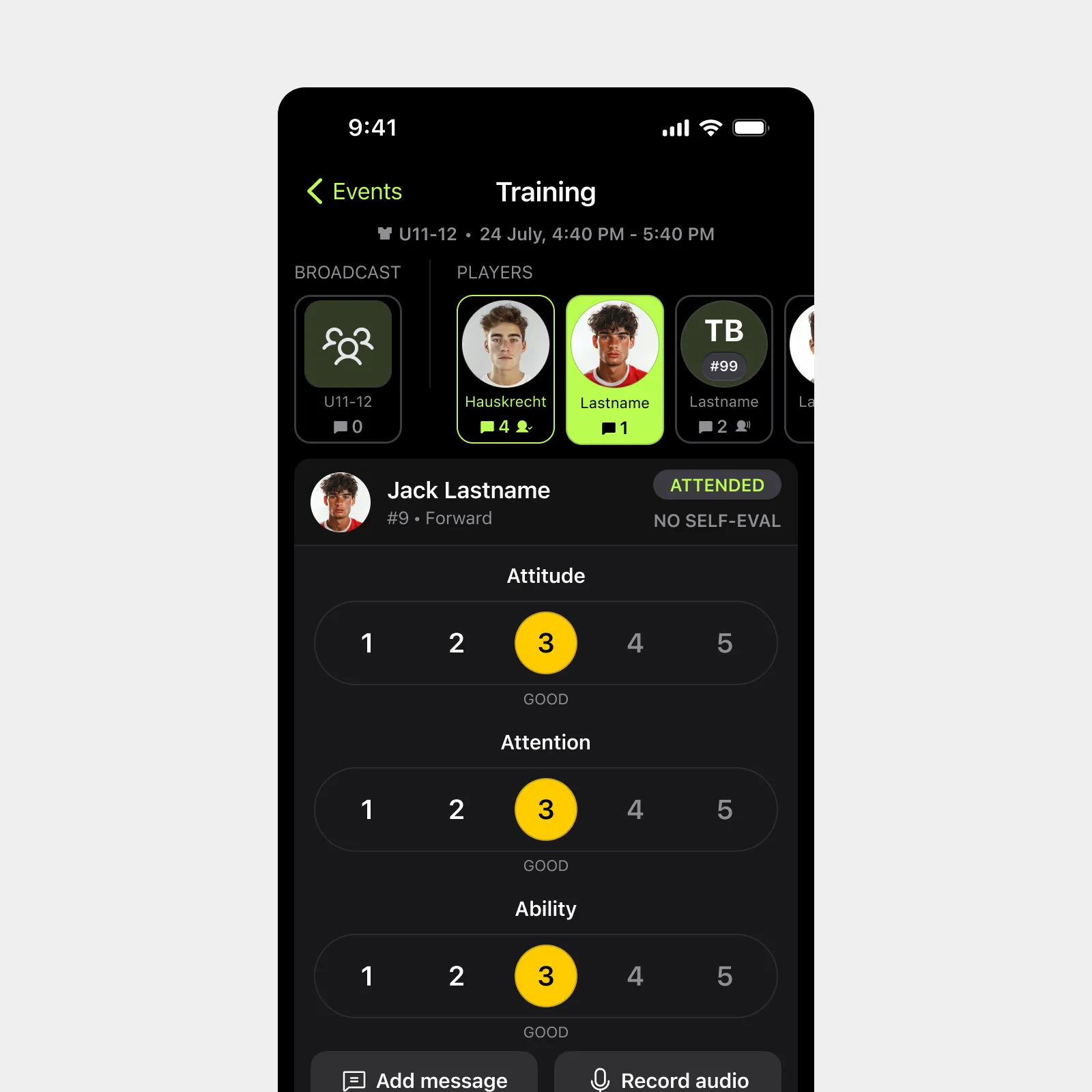
Feedback is both quantitative (through 1–5 ratings) and qualitative (through short notes or voice comments). Players can respond directly, building a continuous conversation that connects every event to individual growth.
Who it's for:
- Coaches who want to track player development in a structured, repeatable way
- Players who want clear, consistent input to understand how to improve
- Organizations seeking visibility into player progress across teams
How it works
- Start from any event
After a practice or game, a coach opens the session in the app and selects the “Evaluate Players” option. - Rate performance across pillars
Each player can be rated 1–5 in key categories defined by the coach or organization (e.g. Effort, Awareness, Skill Execution, Team Play). - Add feedback notes or voice comments
Coaches can include short text notes or record voice feedback, making it easy to capture specific, contextual observations. - Share with players
Once submitted, evaluations automatically notify players. Players can view their scores, read notes, and reply directly to their coach if enabled. - Track progress over time
All evaluations roll up into each player’s profile, feeding analytics views and trend charts to highlight growth or areas needing attention.
Key Benefits
- Structured and consistent communication
Every evaluation uses the same framework, keeping feedback aligned across coaches and sessions. - Better player engagement
Players receive timely, specific, and motivational insights — and can respond, ask questions, or acknowledge feedback. - Quantifiable development data
Numeric scores create a measurable record that helps coaches track improvement, identify patterns, and plan next steps. - Time-saving for coaches
Pre-filled pillars and quick rating workflows make evaluations fast to complete after each event. - Integrated with analytics and messaging
Evaluations automatically power progress tracking and are visible in communication threads for context-rich discussions.







See it in action
Experience how simple it is to plan, run, and track tryouts from your phone. Watch the demo and explore the full workflow in under 2 minutes.